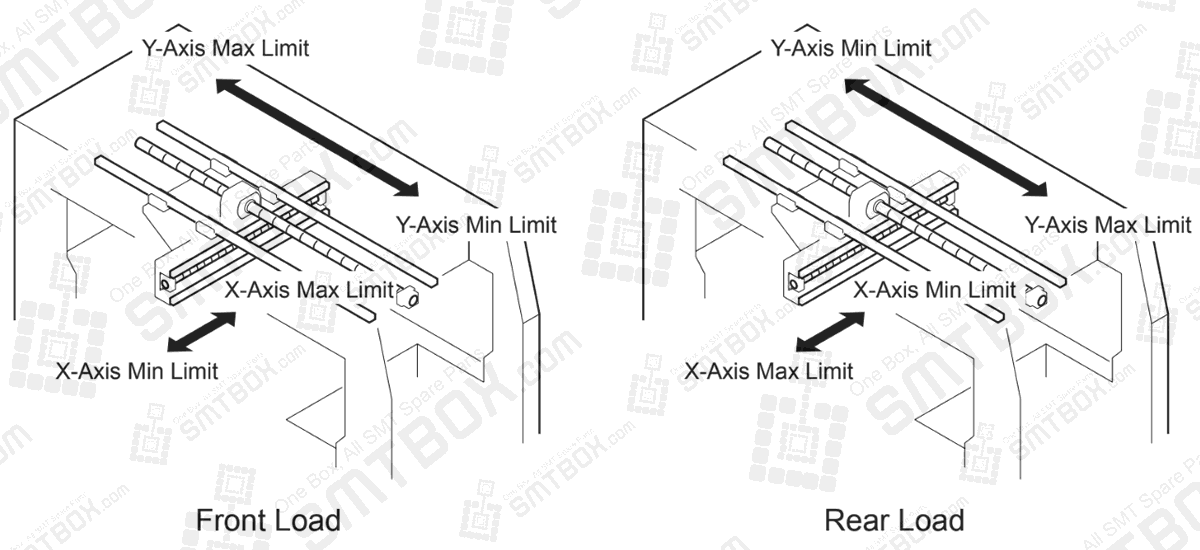
Having issues with Part 1 – Measuring X- and Y-Axis Proper Data on FUJI QP-242E Placement Machine? Read our step-by-step SMT maintenance solution below. If you require replacement feeders, nozzles, or sensors, contact SMTBOX for OEM-compatible parts.
What is the Max and Min Limit Positions X/Y?
Description:
The Max/Min limit positions are used to stop the axes from hitting the stopper.
During normal operation the machine will generate an error if a command to move outside these ranges is received, however when inching an error will be generated if the axis hits the limit position.
Procedure:
1. Push the head against the max limit mechanical stopper.
2. Press [SET] – [PROPER] – [ID CODE] – [Module #] – [MAX/MIN] – [Select axis] – [MAX LIMIT] – [SET].
3. Push the head against the min limit mechanical stopper.
4. Press [SET] – [PROPER] – [ID CODE] – [Module #] -[MAX/MIN] – [Select axis] – [MIN LIMIT] – [SET].

Our editorial team consists of senior SREs, mechanical engineers, and SMT assembly specialists focused on PCB assembly line optimization. All technical articles are reviewed and verified for mechanical and electronic compatibility before publication.