Having issues with The CCD Camera Rear Panel Setting on Samsung Techwin SM321 SMT Component Placer? Read our step-by-step SMT maintenance solution below. If you require replacement feeders, nozzles, or sensors, contact SMTBOX for OEM-compatible parts.
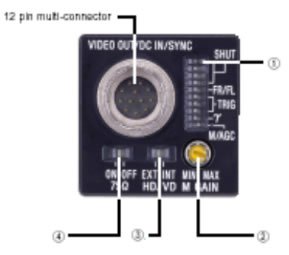
#1. Shutter Speed/Mode Setting(DIP Switch)
#1.1 Switch 1-4 : Shutter speed | Switch-Setting: OFF
#1.2 Switch 5 : FRAME/FIELD | Switch-Setting: FRAME
#1.3 Switch 6-8 : External trigger shutter mode, restart/reset mode | Switch-Setting: Normal
#1.4 Switch 9 : Gamma ON/OFF | Switch-Setting: OFF
#1.5 Switch 0 : GAIN | Switch-Setting: Manual
#2. Manual GAIN (M GAIN) control knob | Switch-Setting: Middle
#3. HD/VD signal input/output switch | Switch-Setting: EXT
#4. 75Ω termination switch | Switch-Setting: OFF

Our editorial team consists of senior SREs, mechanical engineers, and SMT assembly specialists focused on PCB assembly line optimization. All technical articles are reviewed and verified for mechanical and electronic compatibility before publication.